What Is a Cloud Gateway and Who Needs One? | Buying Guide
A cloud gateway is a router with a built-in controller — one box running your Wi-Fi, switches and cameras. Who needs one, and when the UniFi UDM-Pro fits.
By Amesha · AccessStore.lk7 min read
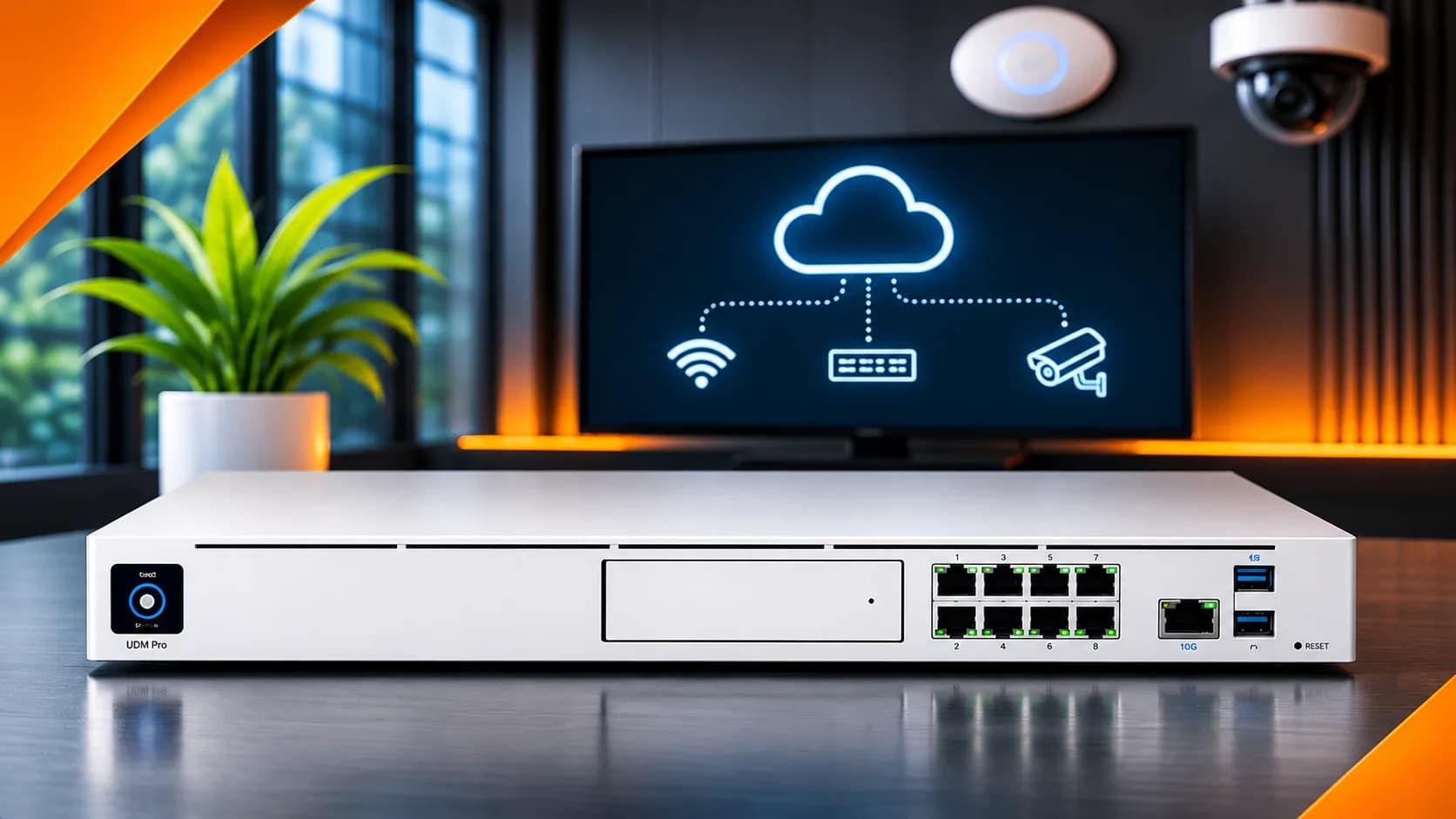
A cloud gateway is a router with a built-in network controller. Instead of buying a router and a separate controller to manage your access points, switches and cameras, one box does both: it routes your internet traffic and runs the software that manages every device on the network from a single dashboard. UniFi calls its version a Cloud Gateway, and the one AccessStore.lk stocks is the UniFi Dream Machine Pro (UDM-Pro) — a rackmount console that runs the whole UniFi system for an office, hotel or campus.
If you have ever set up a UniFi access point and wondered where the controller lives, this guide answers it. We explain what a cloud gateway does, how it differs from a regular router, who actually needs one, and how to size one for your network.
What a cloud gateway actually does
A cloud gateway does three jobs in one box.
First, it is the router. It sits between your internet connection and your network, routes traffic, and (on the UDM-Pro) runs intrusion detection and prevention (IDS/IPS) to block known attacks. The UDM-Pro routes at up to 10 Gbps and inspects traffic at up to 3.5 Gbps with IDS/IPS on.
Second, it is the controller. UniFi access points, switches and cameras are managed centrally, and the controller is the software that does it — adopting devices, pushing settings, updating firmware and showing the whole network on one screen. On a cloud gateway the controller runs inside the box, so there is nothing extra to install on a PC or a separate Cloud Key.
Third, it runs the UniFi applications. On the UDM-Pro these are UniFi Network (Wi-Fi, switching and routing), UniFi Protect (cameras and video recording), UniFi Access (door access) and UniFi Talk (phones). Add a hard drive and the UDM-Pro becomes the video recorder for your cameras as well — it has a 3.5-inch (or 2.5-inch) SATA drive bay. The drive itself is not included.
You manage all of it from one dashboard, in the office or remotely through the UniFi cloud portal. That single-dashboard point is the whole reason cloud gateways exist: one place to see every device, every client and every alert.
Cloud gateway vs a regular router
| Cloud gateway (UDM-Pro) | Regular router | |
|---|---|---|
| Routing and internet | Yes — up to 10 Gbps routing, 3.5 Gbps IDS/IPS | Yes |
| Built-in network controller | Yes — manages UniFi APs, switches and cameras | No — needs a separate controller or Cloud Key |
| Camera recording (Protect) | Yes — with a hard drive fitted | No |
| Door access and phones | Yes — Access and Talk applications | No |
| Wi-Fi built in | No — add UniFi access points | Often yes, on home routers |
| PoE ports | No — add a PoE switch | Sometimes, on small routers |
| Best for | Offices, hotels and campuses running UniFi | A single network with no managed devices |
The important row is the Wi-Fi one. The UDM-Pro has no Wi-Fi radio and no PoE ports. It is not a replacement for your access points — it is the box that manages them. A typical setup is a UDM-Pro plus UniFi access points for Wi-Fi and a UniFi or FortiSwitch PoE switch to power them. If you want Wi-Fi in one box, look at a home router or a UniFi model with a built-in radio instead.
Who needs a cloud gateway
An office, hotel or campus running UniFi. This is the core case. If you have (or plan to have) several UniFi access points and switches, a cloud gateway removes the separate controller and gives you one dashboard for the whole site. The UDM-Pro supports 100+ UniFi devices and 1,000+ clients, which covers most small and medium sites.
A site with cameras. If you run UniFi cameras, the UDM-Pro with a hard drive is the recorder — no separate NVR to buy, power and maintain. The cameras, the Wi-Fi and the network all live under the same dashboard.
A business with more than one site. A cloud gateway at each site, all visible in the same UniFi cloud account, is far easier to look after than a controller at every site. Changes, firmware updates and alerts are handled centrally.
Anyone who wants one dashboard instead of three logins. A router admin page, a separate controller and a separate NVR means three places to check when something goes wrong. A cloud gateway collapses that to one.
Who does not need one
A home with one access point. A single UniFi AP can be set up with the free UniFi Network application on a computer, or with a small gateway. A rackmount UDM-Pro is overkill for a flat.
A network that already has a controller. If you already run a Cloud Key or a software controller that works, a cloud gateway adds nothing — keep the controller you have.
A site that needs a full UTM firewall. A cloud gateway routes and inspects traffic, but it is not a next-generation firewall. If you need intrusion prevention, antivirus, web filtering, application control and secure SD-WAN in one appliance, that is FortiGate territory, not a cloud gateway. Read our FortiGate firewall buying guide for Sri Lanka if that is what you need.
How to choose the right one
Count your devices and clients. Add up your access points, switches and cameras, and the number of people and devices that will connect. The UDM-Pro handles 100+ UniFi devices and 1,000+ clients — if you are well under that, it has room to grow; if you are near it, talk to us before you buy.
Check your internet speed against the throughput. The UDM-Pro routes at up to 10 Gbps and inspects at up to 3.5 Gbps with IDS/IPS on. If your connection is a gigabit line, it has plenty of headroom. The number that matters is the IDS/IPS figure, because that is the speed with security inspection running.
Plan your WAN ports. The UDM-Pro has one gigabit RJ45 WAN port and one 1/10G SFP+ WAN port — useful if you have a fibre connection or want a second WAN link. Its LAN side is eight gigabit RJ45 ports plus one 1/10G SFP+ port, so it connects directly to your switch.
Decide about cameras now. If you will run UniFi Protect, fit a surveillance hard drive at the start — the bay takes a 3.5-inch or 2.5-inch SATA drive, and the drive is not included. Adding it later means opening the unit again.
Remember what it does not do. No Wi-Fi radio, no PoE. Budget for access points and a PoE switch alongside it — a PoE switch powers the access points and cameras over the same network cable.
The UniFi Dream Machine Pro
The UDM-Pro is AccessStore.lk's cloud gateway. It is a 1U rackmount unit (442.4 × 43.7 × 285.6 mm, 3.90 kg) with a 1.3-inch touchscreen on the front for at-a-glance status. Inside is a quad-core ARM processor, 4 GB of memory and 16 GB of storage, drawing up to 33 W. It runs UniFi OS with the Network, Protect, Access and Talk applications, and it manages 100+ UniFi devices and 1,000+ clients. It is sold Price on request — tell us about your site and we will quote it, with islandwide delivery across Sri Lanka.
Frequently asked questions
What is a cloud gateway? A cloud gateway is a router with a built-in network controller. It routes your internet traffic and runs the software that manages your access points, switches and cameras from one dashboard, instead of needing a separate controller.
Is a cloud gateway the same as a router? No. Every cloud gateway is a router, but not every router is a cloud gateway. A cloud gateway also contains the controller and the applications that manage your network devices — a regular router does not.
Does the UniFi Dream Machine Pro have Wi-Fi? No. The UDM-Pro has no Wi-Fi radio and no PoE ports. It manages UniFi access points, but you still need access points for Wi-Fi and a PoE switch to power them.
Can the UDM-Pro record cameras? Yes. It runs UniFi Protect and has a 3.5-inch (or 2.5-inch) SATA hard-drive bay, so with a drive fitted it becomes the video recorder for your UniFi cameras. The drive is not included.
Do I need a cloud gateway for a small office? If your office has several UniFi access points or switches, yes — one cloud gateway replaces a separate router and controller and gives you a single dashboard. If you have a single access point, a smaller setup is enough.
Related: UniFi Dream Machine Pro (UDM-Pro) · Cloud Gateways · UniFi buying guide · FortiGate firewall buying guide · Switches · Wi-Fi