MikroTik Router Price in Sri Lanka | Buying Guide
MikroTik router price in Sri Lanka: compare hEX, RB5009, L009 and CCR routers for home, office and fibre networks. Local warranty, islandwide delivery.
By Amesha · AccessStore.lkUpdated 9 min read
MikroTik routers suit anyone who wants full control of their network: a home lab, a small office, a branch, or an ISP that needs a lot of ports in a rack. Every MikroTik router runs the same RouterOS software, so the difference between models is ports, processing power and fibre options, not the features you get. All six picks below are genuine MikroTik stock at AccessStore.lk, available to order with local warranty and islandwide delivery. All routers are Price on request, so send us your line speed, user count and device list and we will quote the model that fits.
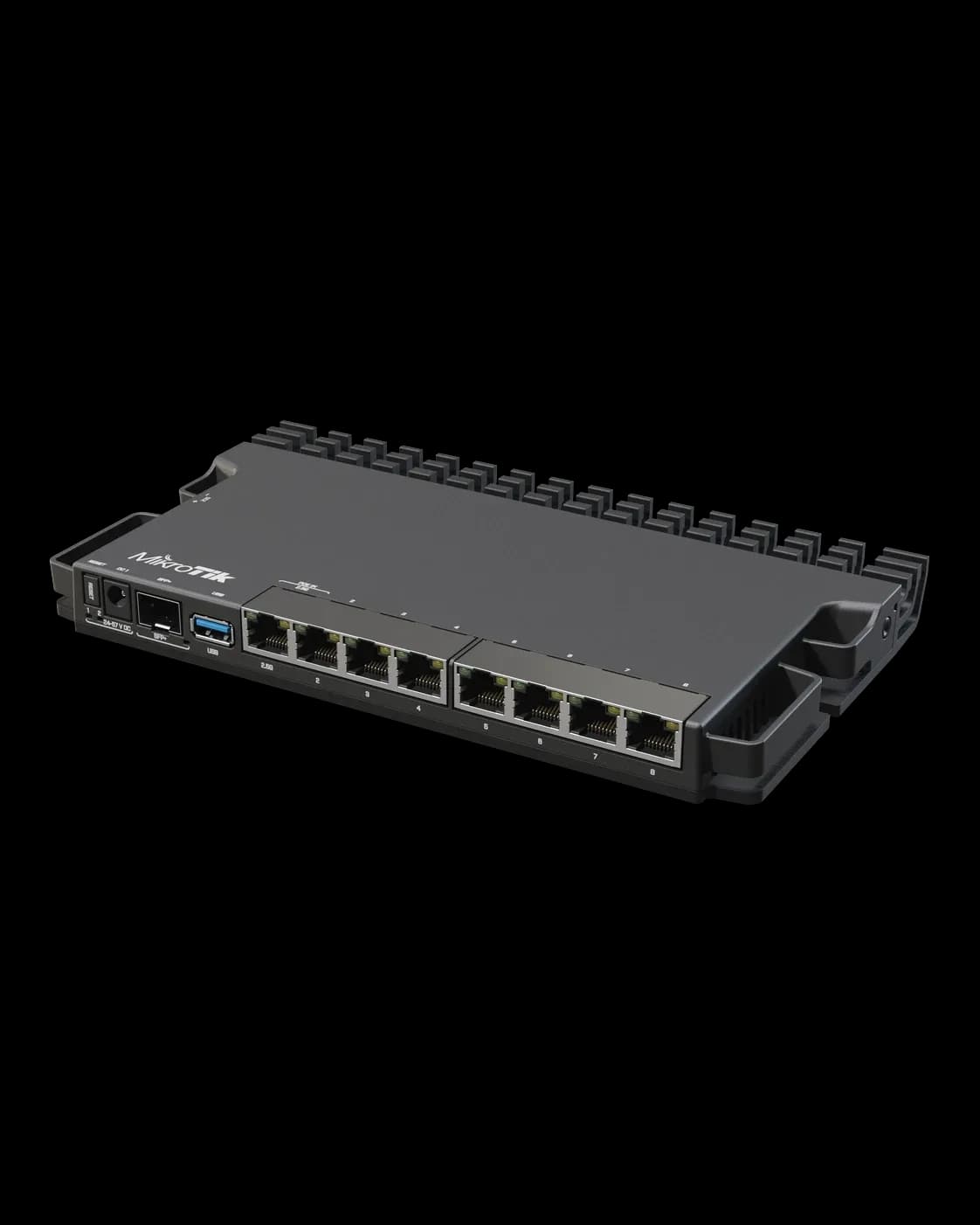
Short answer: the MikroTik RB5009UG+S+IN is the best MikroTik router in Sri Lanka for most buyers. Seven Gigabit ports, a 2.5 Gigabit port and a 10 Gigabit SFP+ cage cover wired devices and a fibre uplink, and the quad-core ARM CPU handles firewall rules, queues and VPNs without slowing down, so one box fits a home lab, a small office or a busy branch.
Best overall: MikroTik RB5009UG+S+IN
This is the router to buy if you want one box that does everything well. It gives you seven Gigabit Ethernet ports, a 2.5 Gigabit port, a 10 Gigabit SFP+ cage for fibre and a USB 3.0 port, all connected through a switch chip to a quad-core ARM CPU running at 1.4 GHz with 1 GB of RAM, so routing, firewall rules and VPNs stay fast even under load. It can be powered three ways, by PoE-in, a DC jack or a 2-pin terminal, and it needs no fan, so it runs silent on a desk or a shelf. Four units fit in a single 1U rack space with mounting accessories, which is handy if you run several sites. See the RB5009UG+S+IN.
Best budget / small office: MikroTik hEX (RB750Gr3)
The simplest way into a proper MikroTik router. This 5-port box gives you five Gigabit Ethernet ports, a USB port and a microSD slot, powered by a dual-core 880 MHz CPU with 256 MB of RAM and IPsec hardware encryption, so VPN links stay fast. It accepts passive PoE-in, so you can power it from a PoE switch or injector, and RouterOS gives you the same VLANs, firewall rules and queues as the bigger models. It is the right pick for a small office or a home where five wired ports cover the main devices and you want a dependable router without paying for ports you will not use. See the hEX.
Best for home: MikroTik hEX refresh (E50UG)
The classic home router, made stronger. The hEX refresh keeps the same idea as the original hEX, five Gigabit Ethernet ports in a small, affordable box, but swaps in a modern dual-core 950 MHz ARM processor and doubles the RAM to 512 MB, so routing, firewall rules and VPNs feel noticeably snappier. A full-size USB port lets you add storage and share media across your devices, and RouterOS v7 gives you VLANs, queues, firewall control and more in one tidy package. If you want a dependable wired router for your home or small office, this is an easy pick. See the hEX refresh.
Best for business / high throughput: MikroTik CCR2116-12G-4S+
When the office grows past a desktop router, this is the step up. The CCR2116 runs a 16-core ARM CPU at 2 GHz with 16 GB of RAM, so it keeps routing, firewalling and VPNs fast even with many users and heavy rules. It gives you 12 Gigabit ports for traffic plus a dedicated management port, and four 10 Gigabit SFP+ cages for fast fibre uplinks to your core switch or ISP. This is the router for a head office, a busy branch or an ISP edge where the router must never become the bottleneck. See the CCR2116-12G-4S+.
Best with SFP / fibre: MikroTik CCR2004-1G-12S+2XS
If your network runs on fibre, this is the router built for it. The CCR2004-1G-12S+2XS gives you twelve 10 Gigabit SFP+ cages and two 25 Gigabit SFP28 cages, so you can connect fibre links from your ISP, your core switches and other buildings without a separate aggregation switch. A quad-core 1.7 GHz CPU with 4 GB of ECC memory handles the routing, and a single Gigabit port covers management. Choose it when most of your uplinks are fibre and you want the router itself to be the fibre hub. See the CCR2004-1G-12S+2XS.
Best for branch offices: MikroTik L009UiGS-RM
Branches need a router that fits a rack, survives on its own and is easy to manage remotely. The L009UiGS-RM is a 1U rackmount router with eight Gigabit Ethernet ports, an SFP cage that supports 2.5G fibre, a USB 3.0 port and a serial console port, powered by a dual-core 800 MHz CPU with 512 MB of RAM. The console port matters when a remote site goes offline, since it gives you a way back in without a site visit, and the rackmount case keeps the comms room tidy. It is the right pick for a branch office, a shop or a small server room that needs a solid router in a rack. See the L009UiGS-RM.
Also worth a look
Two more models deserve a mention. The MikroTik RB4011iGS+RM gives you ten Gigabit ports and a 10 Gigabit SFP+ cage in a rackmount case, with a quad-core CPU and 1 GB of RAM, and port 10 can provide passive PoE out to another device. And if the overall pick is right but you need to power access points or cameras from the router itself, the MikroTik RB5009UPr+S+IN is the same RB5009 with PoE-out on all eight Ethernet ports.
Compare the picks
| Model | Ports | CPU | SFP | Best for |
|---|---|---|---|---|
| RB5009UG+S+IN | 7x GbE + 1x 2.5G, USB 3.0 | Quad-core ARM, 1.4 GHz, 1 GB RAM | 1x 10G SFP+ | Best overall |
| hEX (RB750Gr3) | 5x GbE, USB, microSD | Dual-core, 880 MHz, 256 MB RAM | None | Best budget / small office |
| hEX refresh (E50UG) | 5x GbE, USB | Dual-core ARM, 950 MHz, 512 MB RAM | None | Home |
| CCR2116-12G-4S+ | 12x GbE + management, M.2 | 16-core ARM, 2 GHz, 16 GB RAM | 4x 10G SFP+ | Business / high throughput |
| CCR2004-1G-12S+2XS | 1x GbE | Quad-core ARM, 1.7 GHz, 4 GB ECC RAM | 12x 10G SFP+ + 2x 25G SFP28 | SFP / fibre |
| L009UiGS-RM | 8x GbE, USB 3.0, console | Dual-core, 800 MHz, 512 MB RAM | 1x SFP (2.5G) | Branch offices |
How to choose
Start with RouterOS. Every MikroTik router runs the same software, so the features are the same across the range: firewall rules, VLANs, queues, VPNs and hotspot control. The licence level differs by model, with higher levels allowing more tunnels and connections, so tell us your VPN and user plans if you run many tunnels. What you are really choosing is how much processing power and how many ports you need.
Then match the CPU to the load. Port-to-port traffic through the switch chip costs the CPU almost nothing, but firewall rules, queues, NAT and VPN encryption all use the processor, so a router that only switches traffic can be small while a router that inspects and encrypts everything needs cores. Count your users, your firewall rules and your VPN tunnels, then pick a CPU with headroom: a dual-core hEX for a home or small office, a quad-core RB5009 for a busy site, and a 16-core CCR2116 when the router must never become the bottleneck.
Next, decide on fibre. If your ISP hands you a fibre connection or your core switch links over fibre, you need an SFP cage, and the speed matters: 1G SFP for a basic fibre uplink, 10G SFP+ for a fast uplink or a core link, and 25G SFP28 when you aggregate several 10G links. The L009 and RB5009 cover a single fibre uplink, the CCR2116 gives you four 10G uplinks, and the CCR2004-1G-12S+2XS is the fibre hub for a site that runs mostly on fibre.
Finally, think about power. Most MikroTik routers accept PoE-in, so you can power them from a PoE switch, but only some models provide PoE-out: the RB5009UPr+S+IN powers devices from all eight of its Ethernet ports, which suits a small site where the router also powers the access points. If you need to power cameras or access points, say so when you request a quote and we will match the router to the power plan. And remember that a router is only one part of the network: if you also need a switch, read our PoE switch buying guide, which explains PoE standards, power budgets and port counts.
Frequently asked questions
Does a MikroTik router have Wi-Fi? No. MikroTik routers are wired-only — they have no built-in Wi-Fi. For wireless coverage, pair the router with a separate access point, such as a FortiAP access point or a UniFi access point. The router handles routing, firewall and traffic control; the access point handles Wi-Fi.
Which MikroTik router is best for home use? For most homes, the hEX refresh (E50UG) — five Gigabit ports, a modern dual-core ARM CPU and 512 MB of RAM. If you want a fibre uplink or PoE, step up to the hEX S (2025), which adds a 2.5G SFP port and PoE in and out.
What is the difference between the hEX and the hEX S? The hEX S adds an SFP fibre port and PoE output on the last port, while keeping the same five Gigabit ports, USB and microSD slot. Choose the hEX S if you have fibre internet or want to power a device over PoE.
Can I connect fibre internet to a MikroTik router? Yes — pick a model with an SFP port. The hEX S and hEX S (2025) take a fibre module for a fibre uplink, the L009UiGS-RM adds a 2.5G SFP port, and the CCR2004 and CCR2116/2216 models offer 10G SFP+ and 25G SFP28 fibre ports for faster links.
Do MikroTik routers need a separate controller? No. Every MikroTik router runs RouterOS on the device itself, so there is no separate controller to buy or run. You manage the router directly through WinBox or its web interface.
Why buy a MikroTik router from AccessStore.lk? Local stock with local warranty and islandwide delivery — no import wait. Many marketplace listings are US-store imports that need a step-down voltage transformer and ship from overseas. Tell us your line speed, user count and device list and we will quote the model that fits.
Find your router
Browse the full MikroTik router range with all 22 MikroTik models, or compare the MikroTik line-up. If you want the full background first, read our FortiGate firewall buying guide if your network also needs a firewall at the edge.
Tell us your line speed, user count and device list and we will put together the right router and quote it for you, with islandwide delivery. Request a quote or call AccessStore.lk on +94 76 101 9946.